Installation of the protocol TCP/IP (if not installed)
First you have to check if the Dial-UP Adapter and the
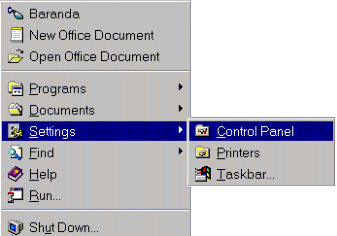
protocol TCP/IP is already installed. To check it out select START,
then go to "Settings - Control Panel", and open the control Panel.
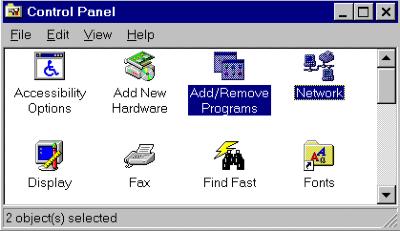
In the "Control Panel" exist various icons from with
we use "Network" & "Add/Remove Programs"
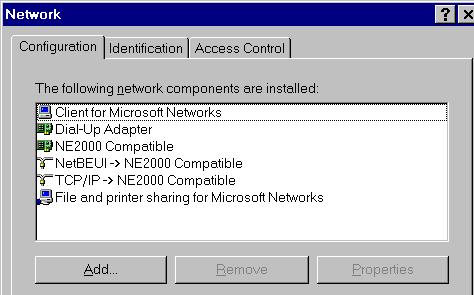
Select "Network", and if the Dial-up Adapter & TCP/IP
is installed, the upcoming image (like below) will tell you so.
If not one of those tow items are shown we first have to install
the Protocol TCP/IP and in the next section we will talk about
the "Dial-Up adapter".
Click at "Add", select "Microsoft " from the list
of "Manufacturers" and under "Protocol" select TCP/IP
and click "OK".
Now in the list should appear (Installed Network Components), the
protocol TCP/IP.
This is all that has to be installed in the 1st session.
From now on
you need the installations disks or CD-Rom for Windows'95. .

 ICA Net Installations
Instructions
ICA Net Installations
Instructions