.
  ICA Net Installations
Instructions
ICA Net Installations
Instructions |

3) Configuration of : Dial-Up
Networking for ICANet.com.mx
Go to "My Computer", there you
will find "DIal-Up Networking"
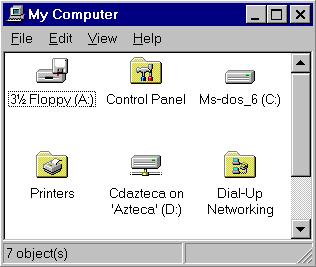 Click on the Icon and than select "Make New
Connection".
Click on the Icon and than select "Make New
Connection".
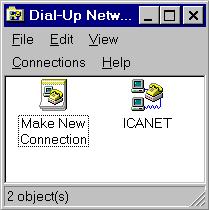 "Make New Connection"
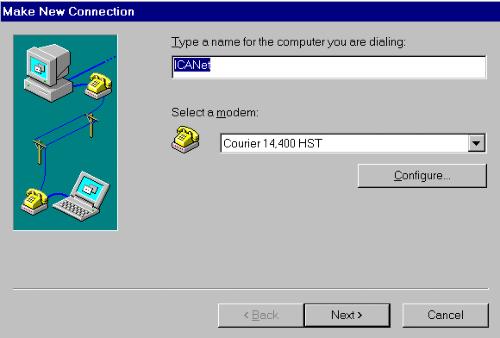 Now enter ICANet as name and check
or select your modem, click "Next".
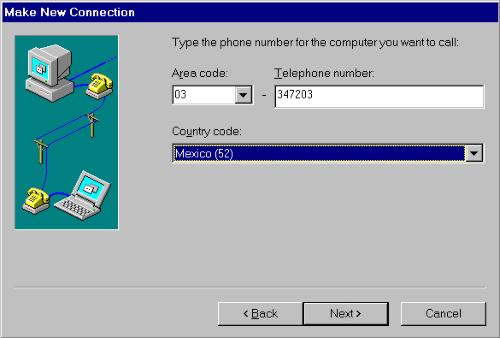
If you are in Tijuana enter 347203 else
if you are anywhere else in Mexico enter nothing for
Area code and enter 91-66-347203 for Tel. Number, then click on
"Next"
(there are some citys in mx where you
now use 01 insted of 91 for long distance)
Now enter ICANet as name and check
or select your modem, click "Next".
If you are in Tijuana enter 347203 else
if you are anywhere else in Mexico enter nothing for
Area code and enter 91-66-347203 for Tel. Number, then click on
"Next"
(there are some citys in mx where you
now use 01 insted of 91 for long distance)
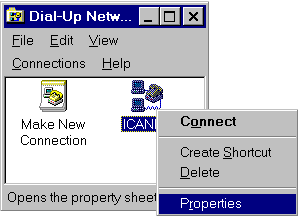
 Now highlight the Icon "ICANet" point
with you mouse to it and make a right bottom click, a menu
appears, select "Properties".
Now highlight the Icon "ICANet" point
with you mouse to it and make a right bottom click, a menu
appears, select "Properties".
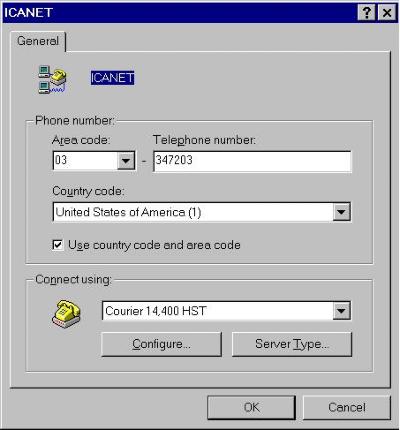
 Now this image comes up. Make sure the Tel. Number is the same
as above and " Use country code and
area code" is not selected.
Now this image comes up. Make sure the Tel. Number is the same
as above and " Use country code and
area code" is not selected.
 Now click on "Server Type"
Than click on:"TCP/IP Settings"
Now click on "Server Type"
Than click on:"TCP/IP Settings"
 Select "Server Assigned IP address" .
Than select "Specify name Server Addresses"
than enter:
for Primary DNS: 207.248.192.11
for Secondary DNS: 207.248.192.12
the rest is all zeros.
It is very important that this entry is
correct otherwise you will not be able to connect to ICANet.
click on "Ok"
Select "Server Assigned IP address" .
Than select "Specify name Server Addresses"
than enter:
for Primary DNS: 207.248.192.11
for Secondary DNS: 207.248.192.12
the rest is all zeros.
It is very important that this entry is
correct otherwise you will not be able to connect to ICANet.
click on "Ok"
Connection automatic or Manual?
Now you have to decide if you want to connect
automatic or manual to your Internet provider, if you want to go for manual
( if you select to input manual, you need each time to input your
Username, password, PPP and F7 via a terminal window) you only have to
go to one more configuration, else you have to go to the next step afterwards
.
Select "Configure" and this image will com up.
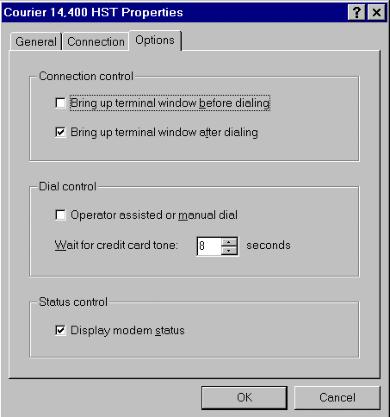 At this window under "Options" select
"Bring up terminal window after dialing"
click "Ok"
( this is the final configuration if you select to input
manual each time your username, password, PPP and F7. If you go for selecting
automatic connection you have to go
back later here and deselect "Bring up terminal window after dialing").
At this window under "Options" select
"Bring up terminal window after dialing"
click "Ok"
( this is the final configuration if you select to input
manual each time your username, password, PPP and F7. If you go for selecting
automatic connection you have to go
back later here and deselect "Bring up terminal window after dialing").