 ICA Net Installations
Instructions
ICA Net Installations
Instructions |

4) (Optional) Automatic Connection via "Script
Tool"
Before you can use the script tool you have to download
the ICANet Script
icanet.scp
(2kb) and copy it into the : c:\Program
Files\Accessories\ directory , Than come back to here.
*
(If you have Win
95 Plus " Script Tool
" is alraedy installed, click here)
*
If you
do not have the Win95 CD
Down load scptool.exe
(54kb) and icanet.scp
(2kb), copy the files into the
c:\Program Files\Accessories\
directory. Click onto scptool.exe to
expand. Afterwards proceed like you had a installation CD.
To install "Script
Tool" (if you have the Win 95 installation
CD, or downloaded scrriptool.exe),
go to "Control Panel" doble "Click" the icon "Add/Remove Programs"
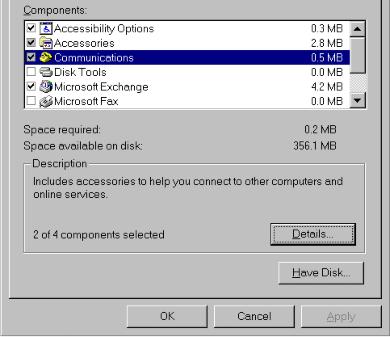
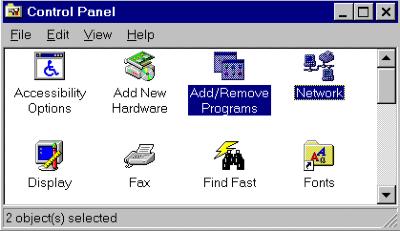 Select "Windows Setup", click on
"Have Disk".
Select "Windows Setup", click on
"Have Disk".
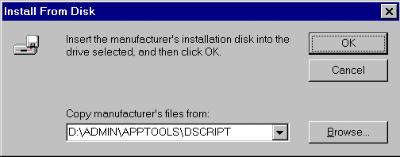
 Browse: "D:\ADMIN\APPTOOL\DSCRIPT",
where D is the drive letter of your
CD Room Drive.
(if you downloaded scriptool.exe
Browse to: "c:\Program Files\Accessories\"
directory)
Browse: "D:\ADMIN\APPTOOL\DSCRIPT",
where D is the drive letter of your
CD Room Drive.
(if you downloaded scriptool.exe
Browse to: "c:\Program Files\Accessories\"
directory)
 select:" SLIP and Scripting for Dial-Up Networking"
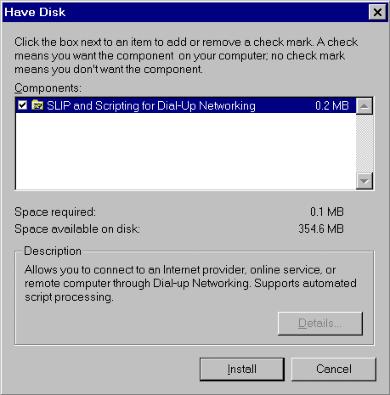 select "Install".
Select :Start,
Programs, Accessories
than:
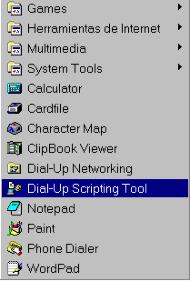 Select "DIal-Up scripting Tool"
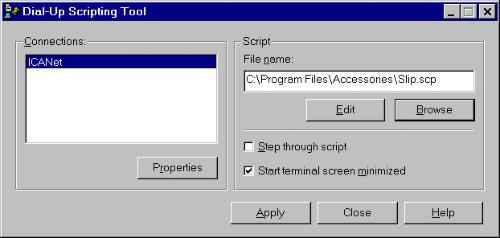
Highlight: ICANet
Under "script" browse for c:\Program
Files\Accessories\ icanet. scp.
select: Start terminal screen minimized
click on : Apply
click on: Close
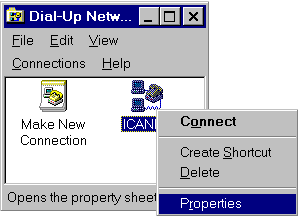
Goto: Dial- Up Networking,
Now highlight the Icon "ICANet" point
with you mouse to it and make a right bottom click, a menu
appears, select "Properties".
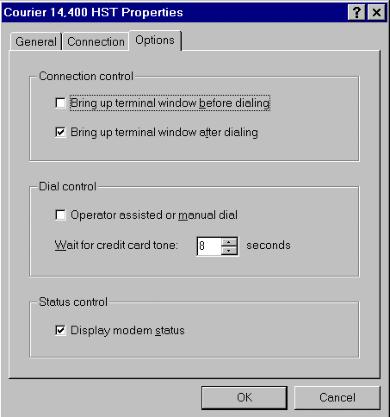 At this window under "Options" deselect
(uncheck): "Bring up terminal window
after dialing"
click "Ok"
At this window under "Options" deselect
(uncheck): "Bring up terminal window
after dialing"
click "Ok"
This is it!!
Downloads
Script de ICANet
icanet.scp (2kb)
"Script Tool"
scptool.exe
(54kb)